February 20, 2026
Load testing emails with namespace quotas
Load tests can overwhelm the wrong environment if they aren’t isolated. They can also eat up your monthly usage before critical tests run.
This guide shows a simple setup for load testing with per-namespace quotas so your high-volume runs stay isolated and your critical environments keep working.
Why quotas help with load testing
Quotas let you cap how many inbound emails a namespace can receive each month. Once the quota is reached, new inbound emails to that namespace are rejected, while other namespaces continue processing normally. This makes quotas a safety valve for big test runs.
Recommended setup (5 minutes)
- Create a dedicated namespace for load tests (for example,
{org}-loadtest). - Route your load-testing traffic to that namespace only.
- Set a quota for the load-test namespace.
- Keep staging or production-like namespaces without quotas.
That way, heavy traffic stays contained and your important workflows remain unblocked.
How to set the quota
Go to: Dashboard → Namespace Settings
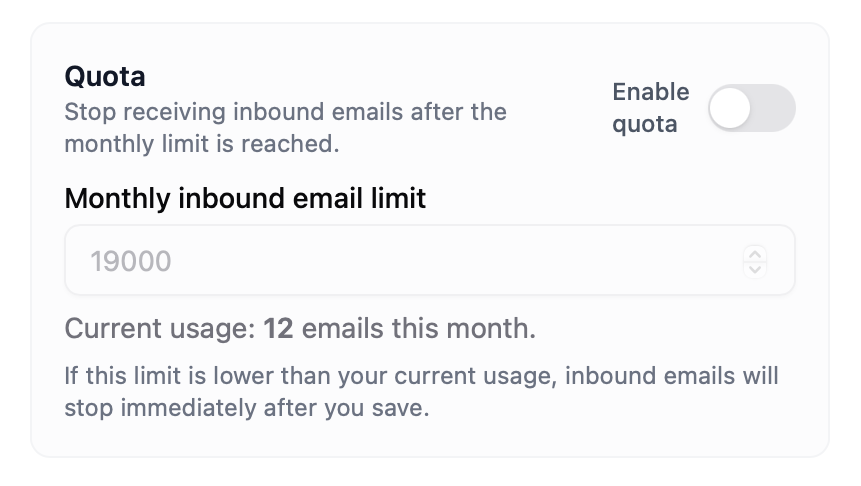
Quota controls are available for all namespaces, and you can toggle quotas on or off per namespace at any time.
When not to use quotas
- Quotas aren’t a good fit for tests that run continuously for hours or days, or for tests that send a very large spike of traffic all at once, because a monthly cap can interrupt the test before the system itself shows any limits.
- You still need to ensure load test traffic is explicitly routed to the load-test namespace, not shared with staging or production-like namespaces.
Practical tips
- Start with a conservative quota for load tests, then raise it once you’re confident your test volume is stable.
- If you’re not sure about volume, run a smaller batch first, then scale up.
- Keep experimental tests in the load-test namespace even outside of major runs.
By combining namespace isolation with quotas, you can push your system hard without risking the environments you actually depend on.